> For the complete documentation index, see [llms.txt](https://docs.inogic.com/llms.txt). Markdown versions of documentation pages are available by appending `.md` to page URLs; this page is available as [Markdown](https://docs.inogic.com/whatsapp4dynamics/features/single-and-double-opt-in-for-whatsapp-marketing-consent.md).
# Single and Double Opt-In for WhatsApp Marketing Consent
The Single and Double Opt-In feature in WhatsApp4Dynamics enables organizations to securely collect and manage customer consent for marketing communications via WhatsApp. This feature ensures that marketing messages are sent only to customers who have explicitly agreed to receive them, supporting compliance with data protection and consent regulations.
Both Customer Insights - Journeys and Sales Module (Other Module) users can configure opt-in workflows to track, validate, and store consent records, either through message templates or marketing forms. The feature supports Single Opt-In by default, with optional Double Opt-In for higher compliance standards.
### **Single Opt-In: How it works**
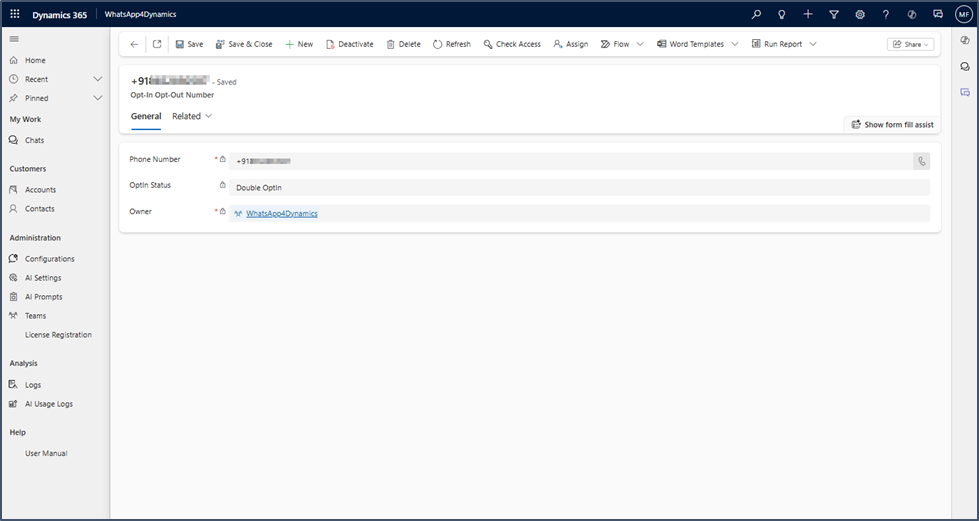
Customers are considered opted in once they respond to an opt-in message (e.g., replying with "Subscribe"). Upon receiving this response, WhatsApp4Dynamics automatically updates the customer's status to Opted-In in the Opt-In / Opt-Out Number records.
### **Behavior:**
* Opted-In: All marketing messages are delivered to the customer.
* Opted-Out: Marketing messages are blocked automatically for the customer.
### View Opt-In / Opt-Out Number Records
1. Navigate to the Configuration entity.
2. Open the desired Configuration.
3. Go to the Related tab > Opt-In / Opt-Out Numbers.
Each phone number has a single active status:
* Single Opt-In
* Double Opt-In (if enabled)
* Opted-Out
### Consent Management in WhatsApp4Dynamics
WhatsApp4Dynamics supports consent management in compliance with global regulatory standards. Customers can choose to opt out of marketing communications, and WhatsApp4Dynamics will honor their preferences accordingly.
For stricter compliance requirements, the system also supports **Double Opt-In**, allowing customers to confirm their consent through a two-step process. It allow you to:
* Create and manage **Consent Message Templates** within WhatsApp4Dynamics.
* Store customer responses as **Opt-In** or **Opt-Out** records.
* Automatically block or allow marketing messages based on recorded consent status
Based on the customer’s response:
* If they reply **Subscribe**, a **Double Opt-In** record is created and stored under **Opt-In and Opt-Out Numbers**.
* If they reply **Unsubscribe**, an **Opt-Out** record is created, and the system stops sending further marketing messages to that number.
You can find the consent message configuration and templates [here](/whatsapp4dynamics/configuration/configure-single-and-double-opt-in-for-whatsapp-marketing-consent.md).