# Rule-Based Alert

Rule-Based Alerts are designed for specific conditions. There are two types of Rule-Based Alerts:

#### 1) Simple Alerts

Simple alerts are rule-based alerts created based on System Views related to the entity whose Entity Configuration has been selected.&#x20;

<figure><img src="https://272130504-files.gitbook.io/~/files/v0/b/gitbook-x-prod.appspot.com/o/spaces%2F-M0QoyqUVI8_HaZ9FOSL%2Fuploads%2Fpk0wGgNqN8n3lwqiifXq%2FRule%20based_1.png?alt=media&#x26;token=35ff1409-32dc-41ca-a9b2-d6d075d075cd" alt="Rule-Based Alert Dynamics 365 CRM"><figcaption></figcaption></figure>

To know how to create Rule-Based Simple Alerts, please [click here.](https://docs.inogic.com/alerts4dynamics/configuration/record-based-alert/rule-based-alert#1-simple-alerts)

#### 2) Advanced Alerts

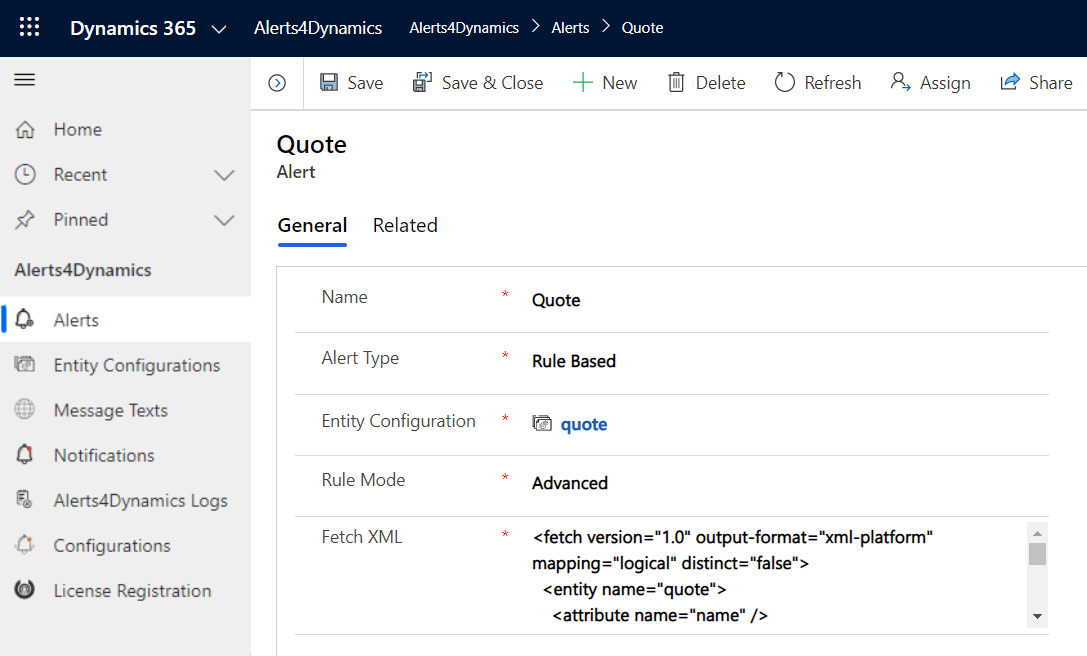
Alerts can be created based on conditions.&#x20;

For eg. If you want to create alerts for all the Invoices whose Total Amount is greater than or equal to 1000 then you have to enter the Fetch XML for it. Below is the Fetch XML for Total Amount in Invoices greater than or equal to 1000.

```
<fetch version="1.0" output-format="xml-platform" mapping="logical" distinct="false">
  <entity name="invoice">
    <attribute name="name" />
    <attribute name="customerid" />
    <attribute name="statuscode" />
    <attribute name="totalamount" />
    <attribute name="invoiceid" />
    <order attribute="name" descending="false" />
    <filter type="and">
      <condition attribute="totalamount" operator="ge" value="1000" />
    </filter>
  </entity>
</fetch>
```

In the same way, you can create Advanced Alerts for other records also.

<figure><img src="https://272130504-files.gitbook.io/~/files/v0/b/gitbook-x-prod.appspot.com/o/spaces%2F-M0QoyqUVI8_HaZ9FOSL%2Fuploads%2FA9tE4oVP0i5nehKu9006%2FRule%20based_2.png?alt=media&#x26;token=6af6de8c-1ee0-436f-b23b-7d2a759d7d4a" alt="Rule-Based Alert Dynamics 365 CRM"><figcaption></figcaption></figure>

To know how to create Rule-Based Advanced Alerts, please [click here.](https://docs.inogic.com/alerts4dynamics/configuration/record-based-alert/rule-based-alert#2-advanced-alerts)

{% hint style="success" %}
For any queries, reach out to us at <crm@inogic.com>
{% endhint %}


---

# Agent Instructions: Querying This Documentation

If you need additional information that is not directly available in this page, you can query the documentation dynamically by asking a question.

Perform an HTTP GET request on the current page URL with the `ask` query parameter:

```
GET https://docs.inogic.com/alerts4dynamics/features/rule-based-alert-simple.md?ask=<question>
```

The question should be specific, self-contained, and written in natural language.
The response will contain a direct answer to the question and relevant excerpts and sources from the documentation.

Use this mechanism when the answer is not explicitly present in the current page, you need clarification or additional context, or you want to retrieve related documentation sections.